
The Opportunity
MC Electric has spent 22 years building something most contractors never get to: a stable base of major customers, public works credentials, two offices, and a 35-person team. The work is there. The systems behind the work are what's holding you in place.
Your accountant retired. You're hiring a replacement. In the meantime, the billing runs through you and your operations officer, two people with accounting backgrounds and two full-time jobs that have nothing to do with preparing invoices. You said it on our call:
"I'm basically doing two jobs right now."
"I'm also the CEO of the company and I can't learn to do everything. I have to find third parties that can assist me."
Right now, the most expensive person at MC Electric is doing data entry at night.
This proposal automates the workflow that put you in that chair: the billing process, from the moment a "ready to invoice" email lands in your accounting inbox to a finished invoice in QuickBooks with the portal confirmation attached.
What Last Night Actually Looked Like
Here is the process you walked me through, the one you were doing in the office the night before our call. For every single invoice:
- An email lands in the accounting inbox. "Milestone 1 and 2 are complete." Site ID at the top.
- Open QuickBooks and locate the site.
- Pull up the purchase order PDF attached to it.
- Read the PO to find the contract amount and work out what Milestones 1 and 2 are worth.
- Apply the rules that aren't written on any PO. Tesla bills 20% at project start. Every customer has their own.
- Determine whether a release goes with it, and prepare the release.
- Build the invoice in QuickBooks.
- Log into that customer's portal. Procore for Electrify America. Ariba for T-Mobile. Tesla's own system.
- Enter the same invoice again, field by field, in their system.
- Download the submission receipt and attach it back to the QuickBooks invoice as proof.
Ten steps. Per invoice. Across roughly 70 active projects. This is not a billing process. It is a second job, and right now the CEO is the one working it.
What it's costing
Executive hours. You told me you'd have to think hard to put a number on the time, but that it's significant, and it had you in the office at night. Conservatively, if billing absorbs even 6 to 10 hours a week across you and your operations officer, that's 300 to 500 executive hours a year spent on work a system can do in seconds. Those hours don't come back, and they're coming out of the two roles that actually grow the company.
The training tax. You said it yourself: "even when I train an accountant on my side..." You are the training program. Every rule that lives in your head has to be transferred, customer by customer, before a new hire can run billing without you. Until then, you're still in the loop.
The ceiling. Ten customers today, 70 projects. Every new contract adds invoices to a process that only scales by adding more manual hours. The process that got you here caps where you go next.
Why Hiring Alone Doesn't Fix This
You're hiring a full-time accountant, and you should. But hiring fixes who does the work. It doesn't fix the work.
Without this system, your new accountant inherits the same ten-step loop: the PO hunt, the portal re-entry, the receipt filing. Months of training on ten customers' unwritten rules, with you as the trainer. A meaningful slice of a full-time salary going to data entry that doesn't need a human, let alone an accounting brain.
With the system in place before they start, the picture changes:
- They start ahead instead of behind. Invoices arrive in QuickBooks already built. Their job is to review and submit, days of training instead of months.
- The role does what you're paying for. Payables, reconciliation, reporting, the work that actually needs an accountant, instead of copying numbers between systems.
- The rules stop living in your head. Tesla's 20%, who uses which portal, what gets a release. Written down once, applied automatically every time, surviving every vacation and every future hire.
You're hiring an accountant, not a data-entry clerk. The system makes sure that's the job they actually do.
Why This Isn't Simple
Connecting an inbox to QuickBooks is easy. What makes your billing hard is everything around that connection, and it's exactly where off-the-shelf tools fall over:
The rules engine. Every customer bills differently, and the most important rules appear on no document. The system needs a per-customer rulebook, built with you, that AI applies on every invoice: milestone structures, percentage rules, release requirements, portal quirks.
Reading purchase orders like a person does. The dollar amounts live inside PO PDFs, in ten different customers' formats. The system has to open the PO, find the right milestones, and pull the right numbers, the judgment step that currently requires you. This is AI document extraction tuned and tested per customer, on your real POs.
Two systems of record that must always match. QuickBooks is your truth; each customer's portal is theirs. The system has to keep them aligned, including filing the portal's submission receipt back onto the QuickBooks invoice so the proof trail you rely on today stays intact.
Doing it inside Microsoft 365 properly. The trigger is your accounting inbox. That means a secure, approved connection to your Microsoft 365 environment, done through Microsoft's own access controls, with nothing reading anything beyond the inbox it's supposed to watch.
The System
One flow, end to end:
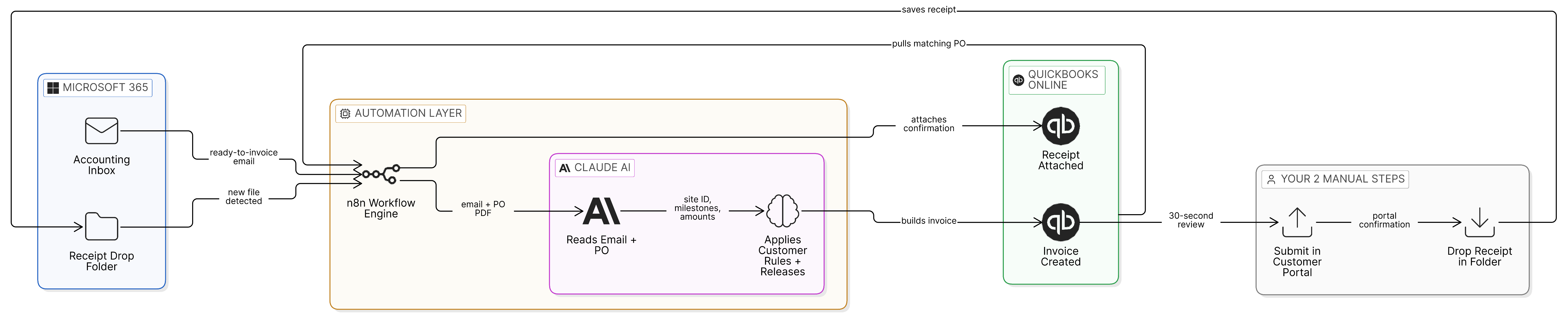
The billing system, end to end. Gray = your two manual steps, kept by design. (Click the diagram to view it full size.)
What stays manual, on purpose: the portal upload itself. Tesla, Ariba, and Procore don't open their systems to outside automation on your accounts, and anything that pretends otherwise breaks the first time they change a login screen. The system takes you from a ten-step process to two: submit in the portal, drop the receipt in the folder. Everything else runs itself.
What gets built
- Accounting inbox monitor (Microsoft 365) that recognizes "ready to invoice" emails and pulls the site ID and milestone instructions
- AI extraction that locates the PO in QuickBooks and reads contract amounts and milestone values, tested against real POs from each customer
- Per-customer rules engine covering all ~10 customers, built with you in a working session, documented and yours
- Automatic invoice creation in QuickBooks Online, flagged for your (or your accountant's) review
- Receipt drop folder: portal confirmations auto-matched and attached to the right QuickBooks invoice
- Error handling and alerts, so anything the system isn't sure about gets routed to a human instead of guessed
- Training and handoff built for a team that's been burned by software nobody used: Loom walkthroughs, a written guide, and a live session with whoever touches the system
On security
You flagged it yourself on our call: "your banking is tied to your email." Right instinct, so here is exactly how this is built:
- The inbox connection is approved in your Microsoft tenant, scoped to the accounting inbox alone, and revocable from your side at any time.
- QuickBooks connects through Intuit's official interface with their one-time production approval. No passwords are handed over or stored.
- The AI reads two things per invoice: the "ready to invoice" email and the matching PO. Anthropic doesn't train on this data, and no banking detail or login ever passes through the system.
- Your customer portal logins stay with you. Keeping that step manual isn't just realism about Tesla and Ariba, it keeps your credentials out of the automation entirely.
One Process Down, Four To Go
Billing is the worst offender, but it isn't the only process running on the same pattern. On our call you described four more, each with the same shape billing has: repeated steps, unwritten rules, hours that only scale by adding people.
Your estimator downloads plans from email to the server, copies site details onto the tracker, then chases the customer for a due date. Your foremen do their daily checks on paper, and by the time anyone verifies them, "they're already off-site." Closeout photos get dumped at the end of the job instead of captured in phase. Payments get recorded in QuickBooks by hand, one notification at a time.
You also told me what happens when this gets fixed wrong. You brought in a CRM nobody used and you're still paying for it. T-Sheets was affordable until it wasn't. Buying the wrong system, or the right system in the wrong order, costs more than building the right one.
And you named the real constraint yourself:
"I think I can map it out. I just don't have the time to sit there and create it."
That's what the roadmap in Option A is for. Five working sessions where I do the mapping with you, then the three biggest systems fully architected and priced, sequenced by return. The next build decision gets made on numbers, not on a sales pitch. And the blueprints are yours either way, whoever builds them.
Your Options
Two ways to do this. Same billing system in both. The difference is how far we map the rest of your operation, because on our call the billing system was one of five you described.
- The complete billing automation system (everything listed above)
- Up to five 1-hour working sessions across your operation: estimating, field reporting, closeout packages, payables
- 3 systems fully architected: complete design, fixed price, and a sequenced roadmap for each, so you know exactly what to build next, what it costs, and what it returns
- The blueprints are yours to keep, whoever builds them
- 3 core revisions after delivery
- 45-day warranty (extended from my standard 30)
- The complete billing automation system (everything listed above)
- 1 roadmap call: your next system outlined, the problem, the approach, and a rough range
- 1 core revision after delivery
- 30-day warranty
A core revision is a change to how the system works within the agreed scope. The warranty separately covers anything that breaks, at no charge. Timelines begin at the kickoff call.
Payment
50% to begin, 50% only when the system is delivered and you've confirmed it works. You never pay for something you haven't seen running.
Guarantee
The system is fully guaranteed to function as described, or I refund your investment. The warranty covers bugs and breakages after delivery at no charge.
The math on your time
Take the conservative version: 6 to 10 hours a week of executive time on billing becomes minutes of review. Either option returns its cost in recovered hours within the first few months, and the hours keep coming back, next year and the year after. You said it best on our call:
"When I think of AI, I think of anything that's repeated should be automated."
This is the most repeated process in your office. It goes first.
Timeline
Week 1 is the same either way: the kickoff call, inbox and QuickBooks access, Intuit's one-time connection approval (those few days are built in), sample POs from each customer, and the rules working session. From there:
| Option | Duration | What to expect |
|---|---|---|
| Option B · The Build | 3 to 4 weeks | The build, tested against your real POs, then training and handoff (Looms, written guide, live session) and your roadmap call. |
| Option A · The Build + AI Roadmap | 3 to 5 weeks | The same build and training, with the five mapping sessions running alongside. The three blueprints land at the end: design, fixed price, sequenced by return. |
The main variable is access: the faster the inbox approval and sample POs land, the faster this ships.
Ongoing Platform Costs
Paid directly to the providers, not to me. There is no VibeHook subscription. The system is yours.
| Service | Monthly | Notes |
|---|---|---|
| n8n (automation engine) | ~$24 | Free if self-hosted on your own server |
| Claude API (the AI reading emails & POs) | ~$10-20 | Pay per use; your volume is light |
| Total | Under ~$50/mo | Verify directly with providers |
And the answer to the T-Sheets problem: the system runs on n8n, which can be moved to your own server at any time. If anyone ever raises prices on you, we move your system onto your own hardware and the bill goes to zero. Nothing here is trapped in anyone's subscription.
What I Need From You
- Confirmation you're on QuickBooks Online (we'll verify at kickoff; Desktop changes the approach)
- Access to the accounting inbox in Microsoft 365 (may need a one-time admin approval in your tenant)
- QuickBooks Online admin access
- Sample POs and one recent invoice from each customer, so extraction is tested on the real thing
- One working session to write down the unwritten rules, customer by customer
- A OneDrive or SharePoint folder where portal receipts will be dropped
- Availability for 2-3 short progress check-ins during the build. Quick calls or asynchronous (a Loom and a reply work fine), whatever your week allows. Option A's mapping sessions are live working sessions and run separately.
- 24-48 hour responses on access and questions
Project Assumptions
- Timeline begins after the kickoff call, not from the date of agreement.
- QuickBooks Online is the accounting system. The rules working session happens in week 1.
- Portal submission (Tesla, Ariba, Procore, etc.) remains a manual step by design; those platforms don't permit outside automation on standard accounts.
- QuickBooks requires a one-time production approval from Intuit for automated connections; the few business days that takes are built into week 1.
- Scope changes beyond the included core revisions follow a simple change-request process.
- Elvia (or a designated team member) is the point of contact for access and approvals.
- I send a progress update every week and respond same-day throughout the build. You will never wonder where things stand.
Other Systems I Can Build
The four you raised on our call, after billing. Option A architects three of them in full.
New bid email arrives → plans saved to the server → site details and due dates pulled onto your Google Sheets tracker automatically, with due-date follow-ups to the customer.
Foremen complete their daily checks from their phone, on site, with accountability built in, instead of paper lists someone verifies after the crew is gone.
Photos captured in-phase and filed automatically, so the closeout package builds itself as the job runs instead of from a photo dump at the end.
Vendor invoices from the AP inbox into QuickBooks, and customer payment notifications recorded automatically.
None of these are scoped or priced in this proposal.
Next Steps
You've already seen this work. The systems Banji walked your group through, the ones that turned a two-day process into a few hours, are mine. This build follows the same pattern: a repeated process, documented rules, AI where judgment is needed, and a system you own at the end.
Happy to jump on a quick call if that's easier. Looking forward to getting your nights back, Elvia.